Cynet, ex Cybernet, ex Semantic Internet, ex info-nebula (the oldest name of the project)
First public version to be released, just a general description, no technical elements yet.
pdf to be downloaded here. For comments, suggestions, discussion I would prefer e-mail messages.
Monday, March 28, 2005


Saturday, January 29, 2005
lost in memories space#4
It was somehow painful to try to define SIOs, Semantic Internet Objects.
While the first drafts were promising I felt that something was wrong and that they didn't fitted with what I expected.
Now I have the feeling that I got the idea expressed properly. And a problem came with that feeling. What came out my private brainstorming is so different from what I know as existing that I suppose that very little people will be interested on that. Not revolutionary as it doesn't need to change things to be (useful), just evolutionary, adding properties to information bits and turning them 'alive'.
In fact this is a sequel to a concept build back in 2000, used for some months, then abandoned, as more urgent things had to be managed.
I always considered documents as something primitive. They have the bad habit to stay there and do nothing else then be available. I consult them and... That's all. They go back to the storage space. Some traces remain as memories in my brain, but why should they stay inactive.
Semantic Internet Objects must be active, reactive, have an independent life and able to remind me there existence if significant changes are to be reported. Thus, SIOs were redefined as 'bots.
They do have a document as the central part. But also the necessary elements to have a life of there own.
A SIO:
have an e-mail address and is able to receive and send messages,
have an history, reporting changes brought by it's authors, and a blog where it announces it's birth, evolution and the building of relations with other SIOs, a 'personal' journal on the Web
surf the Web to identify other SIOs, with which it have affinities, to build relations and aggregates based on ideas, SIOs clubs,
may become independent of it's creator and live in cyberspace it's own life,
would die if it isn't adapted to it's environment,
may give birth to new SIOs independently of any human action.
Science-Fiction? I'll try to convince you that it's time to turn it on Science-Fiction and that the available tools are good enough to build a new community living in cyberspace, interacting with humans.
I will try to go further then theory providing a "proof of concept" if a few people are willing to join the adventure [a quatuor would do].
My limitations as a programmer restrict the entry to MacUsers and will require for each of them at least a Blogger profile (that's the easy part). That's because applescripting is the most I can do on programming (and it's the hard part) and I am accustomed with Blogger's features and limitations.
Technorati tags: blog, tag, applescript, internet, metadata, semantic.
While the first drafts were promising I felt that something was wrong and that they didn't fitted with what I expected.
Now I have the feeling that I got the idea expressed properly. And a problem came with that feeling. What came out my private brainstorming is so different from what I know as existing that I suppose that very little people will be interested on that. Not revolutionary as it doesn't need to change things to be (useful), just evolutionary, adding properties to information bits and turning them 'alive'.
In fact this is a sequel to a concept build back in 2000, used for some months, then abandoned, as more urgent things had to be managed.
I always considered documents as something primitive. They have the bad habit to stay there and do nothing else then be available. I consult them and... That's all. They go back to the storage space. Some traces remain as memories in my brain, but why should they stay inactive.
Semantic Internet Objects must be active, reactive, have an independent life and able to remind me there existence if significant changes are to be reported. Thus, SIOs were redefined as 'bots.
They do have a document as the central part. But also the necessary elements to have a life of there own.
A SIO:
have an e-mail address and is able to receive and send messages,
have an history, reporting changes brought by it's authors, and a blog where it announces it's birth, evolution and the building of relations with other SIOs, a 'personal' journal on the Web
surf the Web to identify other SIOs, with which it have affinities, to build relations and aggregates based on ideas, SIOs clubs,
may become independent of it's creator and live in cyberspace it's own life,
would die if it isn't adapted to it's environment,
may give birth to new SIOs independently of any human action.
Science-Fiction? I'll try to convince you that it's time to turn it on Science
I will try to go further then theory providing a "proof of concept" if a few people are willing to join the adventure [a quatuor would do].
My limitations as a programmer restrict the entry to MacUsers and will require for each of them at least a Blogger profile (that's the easy part). That's because applescripting is the most I can do on programming (and it's the hard part) and I am accustomed with Blogger's features and limitations.
Technorati tags: blog, tag, applescript, internet, metadata, semantic.
Tuesday, January 25, 2005
first step
You must use Mac OS X and have a Blogger acount (logging and password) and at least one blog created (blog ID).
First of all, note the path of your Public Folder; it should be something like "HardDisksName:UserLogging:Public:".
Next, create a text file named GD.txt. I have no idea why I named it like that, didn't annoted the acronym [probabley general data], so feel free to change it, but remember to set it also in the script. It must be placed in your Public Folder.
It contains the CC license information, your ID, and contact details; it may be a flat file or marked to provide links, as the one I used :
<a href="http://creativecommons.org/licenses/by-nc-sa/2.0/" target="_blank"><img src="http://oldcola.blogspot.com/goodies/ico/cc.png" alt="CC logo"> by-nc-sa</a>
by <a href="http://www.blogger.com/profile/1519384" target="_blank">Oldcola</a>
Contact: <a href="mailto:oldcola@gmail.com"><img src="http://oldcola.blogspot.com/goodies/ico/mail.png" alt="mail"></a> - <a href="aim:goim?screenname=avek@mac.com"><img src="http://oldcola.blogspot.com/goodies/ico/ichat.png" alt="iChat"></a> - <a href="callto://oldcola"><img src="http://oldcola.blogspot.com/goodies/ico/skype.png" alt="Skype"></a>
Producing:
 by-nc-saby OldcolaContact:
  -
-  -
- 
Prepare the droplet by including your data in the applescript (using ScriptEditor) and saving it as an application.
A file named tags.txt must be available. If you don't want to use tags, just let it empty. Otherwise, store in it the tags you use.
The description of the file you want to made available, should be in the comments of the file. You can get there by command-I :-)
Just drop the file on the droplet and let it do the job. It will produce a post like this:
- FileName: **test
- Size: 1407,0
- Created: lundi 24 janvier 2005 19:14:19
- Last modified: lundi 24 janvier 2005 21:12:37
This is a single paragraph, showing what an abstract would be like, once the keywords have been replaced by the corresponding tags for technorati use [example: blog, semanticinternet]. On use, it should be a description of the file's contents, a teaser for reader to promote downloading if they are interested, and an inhibitor for useless downloads from lurkers not realy concerned.
Now, the last thing to do is ping Technorati... I'll have to find something better then opening a page in my browser. Some work to do with XML-RPC. If you use Firefox you may use the "open URL" i placed as comment in the script.
A second option is to attach the script to the Public Folder as a "Folder Action". That means that every file will be presented, but the script will fail if you aren't connected. You need to have access to Blogger to post and publish. I may add a part allowing to batch the posts and wait for the next connexion to post them.
The script:
property bloggerAPIKey : "4FCE1E1F9E2DC89044F09D583390AB8A36F4903E"
property username : "loggin"
property myPassword : "password"
property weblogName : "blog name"
property weblogURL : "blog URL"
property blogid : "blog ID"
property content : ""
property autoURL : "True"
property APIURL : "http://plant.blogger.com/api/RPC2"
on open (filename)
set the filename to filename as alias
set ThePost to ""
set theuniquewords to {}
set thefolder to "the path to your public folder" as alias
set thefolders to thefolder as string
set GDFile to thefolders & "GD.txt" as alias
set thefileProp to (info for filename)
tell application "Finder"
set thecomment to the comment of filename
end tell
set thecomment to the comment of filename
end tell
set GDcontent to read GDFile as string
set thetext to thecomment
set thewords to every word of (thetext) as list
set tags to every word of (read ("the path to your Public Folder:tags.txt" as alias))
repeat with i from 1 to number of items in thewords
set this_item to item i of thewords
set this_item to item i of thewords
if theuniquewords contains this_item then
else
if tags contains this_item then
set theuniquewords to theuniquewords & this_item
end if
end if
end repeat
repeat with i from 1 to number of items in theuniquewords
set this_item to item i of theuniquewords
set newform to "<a href=\"http://technorati.com/tag/" & this_item & "\" rel=\"tag\">" & this_item & "</a>"
set the thetext to replace_chars(thetext, this_item, newform)
end repeat
set this_item to item i of theuniquewords
set newform to "<a href=\"http://technorati.com/tag/" & this_item & "\" rel=\"tag\">" & this_item & "</a>"
set the thetext to replace_chars(thetext, this_item, newform)
end repeat
set ThePost to ThePost & "<p><ul><li>FileName: <b>" & name of thefileProp & "</b></li><li>Size: <b>" & size of thefileProp & "</b></li>" & "<li>Created: <b>" & creation date of thefileProp & "</b></li>" & "<li>Last modified: <b>" & modification date of thefileProp & "</b></li></ul></p>"
set ThePost to ThePost & "<p>" & thetext & "</p><p>" & GDcontent & "</p>"
set content to ThePost
if content is "" then
set content to display dialog "Your post is empty!, try again." buttons {"Cancel"} default button {"Cancel"}
else
set postit to display dialog "Are you sure you want to publish this? " & return & return & content buttons {"Cancel", "Post", "Post & Publish"}
set content to display dialog "Your post is empty!, try again." buttons {"Cancel"} default button {"Cancel"}
else
set postit to display dialog "Are you sure you want to publish this? " & return & return & content buttons {"Cancel", "Post", "Post & Publish"}
if button returned of postit is "Post & Publish" then
set publish to true
log publish
set postNumber to newPost(blogid, content, publish)
set publish to true
log publish
set postNumber to newPost(blogid, content, publish)
if autoURL is "true" then
gotoURL(weblogURL)
end if
elsegotoURL(weblogURL)
end if
if button returned of postit is "Post" then
set publish to false
log publish
set postNumber to newPost(blogid, content, publish)
end if
end ifset publish to false
log publish
set postNumber to newPost(blogid, content, publish)
end if
try
(*
tell application "Firefox"
OpenURL "http://www.technorati.com/ping.html?url=http%3A%2F%2Foldcolapublic.blogspot.com%2F"
end tell
*)
end try
end open
-- Replace text
on replace_chars(this_text, search_string, replacement_string)
set AppleScript's text item delimiters to the search_string
set the item_list to every text item of this_text
set AppleScript's text item delimiters to the replacement_string
set this_text to the item_list as string
set AppleScript's text item delimiters to ""
return this_text
end replace_chars
on replace_chars(this_text, search_string, replacement_string)
set AppleScript's text item delimiters to the search_string
set the item_list to every text item of this_text
set AppleScript's text item delimiters to the replacement_string
set this_text to the item_list as string
set AppleScript's text item delimiters to ""
return this_text
end replace_chars
--Sends the XML-RPC code to the remote server
on tellBloggerAPI(methodName, params)
using terms from application "http://www.apple.com"
tell application APIURL
return call xmlrpc {method name:methodName, parameters:{bloggerAPIKey} & params}
end tell
end using terms from
end tellBloggerAPI
on tellBloggerAPI(methodName, params)
using terms from application "http://www.apple.com"
tell application APIURL
return call xmlrpc {method name:methodName, parameters:{bloggerAPIKey} & params}
end tell
end using terms from
end tellBloggerAPI
-- Creates a new post, and possibly it is published
on newPost(blogid, content, publish)
set params to {blogid, username, myPassword, content, publish}
return tellBloggerAPI("blogger.newPost", params)
end newPost
on newPost(blogid, content, publish)
set params to {blogid, username, myPassword, content, publish}
return tellBloggerAPI("blogger.newPost", params)
end newPost
--Opens the weblog in your default browser
on gotoURL(weblogURL)
open location (weblogURL as text)
end gotoURL
on gotoURL(weblogURL)
open location (weblogURL as text)
end gotoURL
Sunday, January 23, 2005
yesterday
With the elements I have presented a few days ago, I tried to imagine the whole system working. Many small problems remained, essentially the need to simplify the process.
On the road to meet some friends [all of them bloggers] I wanted to propose them an experiment about the Semantic Internet and I was seeking something so easy that they wouldn't have to work about it. Then a more appealing schema for the Semantic Internet emerged.
What I wanted:
A central place where a log of everyones production would be accessible. Dated, with the documents title, a small description, abstract like, a link to grab it, with an identification of the author(s) and the mention of the CC
Were people would be able to comment.
A way to use keywords to find everyones files talking about it
A way to follow reactions to an opinion and links proposed by the author of the document.
Two things gave me hard time: The author profile; it should have different views depending who's looking at it: anonymous, family, friend, contact etc. The management of the links proposed by people who visit.
As the main idea was to obtain the desired result with a minimum of development (even without any, if possible) and I was attached to my initial schema, I had some hard time. Then I tried to make sense out of the different acquisitions of Google, imagining that every element should fit.
:-)
The solution came easily enough as I reconsidered the existing tools.
A central place: a blog
This is dated, signed, can carry the documents name at the place of the Title, present a short description as the Post, admit as much Tags as necessary representing the keywords, may have Comment enabled and should have Trackbacks also, and either every element is under the same CC license, or particular ones may be attributed to each post.
If a document is multi-authors, then it is present at each ones blog.
The only element missing is the link to the document, and it could be prepared manually even today.
If the blog is generated automatically each time a document is placed in the Public Folder then the job is done.
If the blog is based in blogspot the search function (within the production of a person/entity) is available.
The essential changes to make concern the "Comments". Now, there is the new "nofollow" attribute avoiding misuse of comments to promote an URL. That would be restricted to any anonymous commenter, while logged in people, could provide somehow trusted links. Maybe people added in "Contacts", the same way as in Flickr, would have the privilege to get access to different versions of the author's Profile, according to there declared status as Friends, Family, Contact etc.
And that's all...
On the road to meet some friends [all of them bloggers] I wanted to propose them an experiment about the Semantic Internet and I was seeking something so easy that they wouldn't have to work about it. Then a more appealing schema for the Semantic Internet emerged.
What I wanted:
A central place where a log of everyones production would be accessible. Dated, with the documents title, a small description, abstract like, a link to grab it, with an identification of the author(s) and the mention of the CC
Were people would be able to comment.
A way to use keywords to find everyones files talking about it
A way to follow reactions to an opinion and links proposed by the author of the document.
Two things gave me hard time: The author profile; it should have different views depending who's looking at it: anonymous, family, friend, contact etc. The management of the links proposed by people who visit.
As the main idea was to obtain the desired result with a minimum of development (even without any, if possible) and I was attached to my initial schema, I had some hard time. Then I tried to make sense out of the different acquisitions of Google, imagining that every element should fit.
The solution came easily enough as I reconsidered the existing tools.
A central place: a blog
This is dated, signed, can carry the documents name at the place of the Title, present a short description as the Post, admit as much Tags as necessary representing the keywords, may have Comment enabled and should have Trackbacks also, and either every element is under the same CC license, or particular ones may be attributed to each post.
If a document is multi-authors, then it is present at each ones blog.
The only element missing is the link to the document, and it could be prepared manually even today.
If the blog is generated automatically each time a document is placed in the Public Folder then the job is done.
If the blog is based in blogspot the search function (within the production of a person/entity) is available.
The essential changes to make concern the "Comments". Now, there is the new "nofollow" attribute avoiding misuse of comments to promote an URL. That would be restricted to any anonymous commenter, while logged in people, could provide somehow trusted links. Maybe people added in "Contacts", the same way as in Flickr, would have the privilege to get access to different versions of the author's Profile, according to there declared status as Friends, Family, Contact etc.
And that's all...
Friday, January 21, 2005
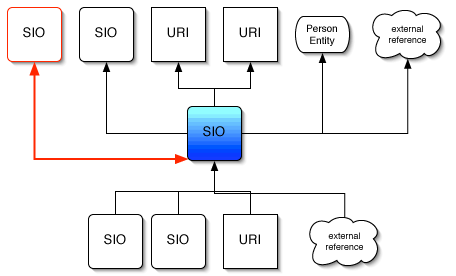
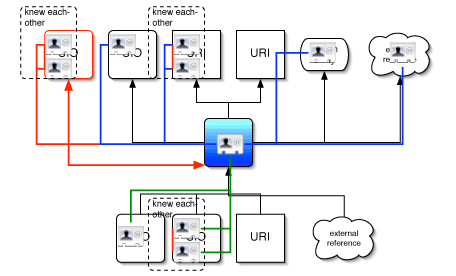
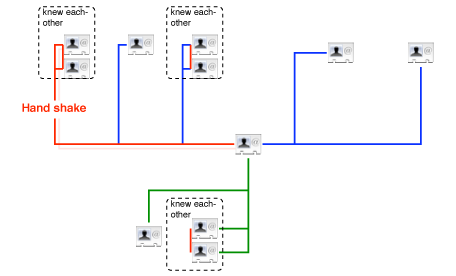
SI Search engine
| Semantic Internet | SIOs 1 - 10 of about nnn for TheQuery. (0.06 seconds) |
[ext - 1,4 Mo] This is the SIO's Title placeholder
This is the author(s) name(s) placeholder, each name is linked to a vCard-like identification page containing the SIOs signed by the author - present in x places
…This is a small excerpt showing TheQuery in it's context… May be replaced by the short description of the SIO if available
Date of publication - Last update - CC lisence - Links - Thread - Categories - Keywords - Find similar
This is just a simulation! Hand-made by modifying Scholar.Google results code. Nice isn't it?
I abused of the "title" attribute, so take a few seconds hovering over elements; there is info hidden.
SIO graph
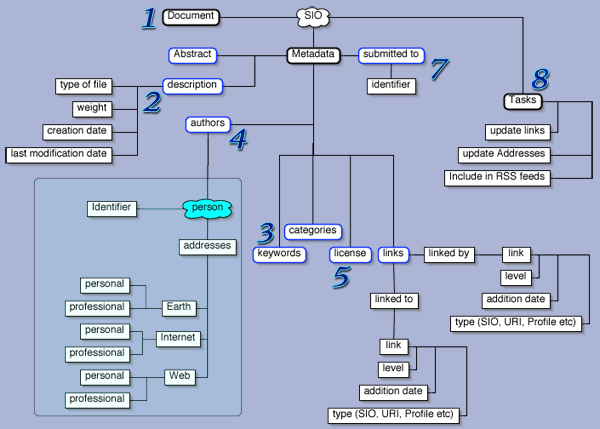
Now, this is just an idea, and, as publish it, I do have in mind to change some things in it, not just details. But this is a scrapbook and drafts are allowed :-)
Subscribe to:
Posts (Atom)