Saturday, January 29, 2005

lost in memories space#4

It was somehow painful to try to define SIOs, Semantic Internet Objects.
While the first drafts were promising I felt that something was wrong and that they didn't fitted with what I expected.
Now I have the feeling that I got the idea expressed properly. And a problem came with that feeling. What came out my private brainstorming is so different from what I know as existing that I suppose that very little people will be interested on that. Not revolutionary as it doesn't need to change things to be (useful), just evolutionary, adding properties to information bits and turning them 'alive'.
In fact this is a sequel to a concept build back in 2000, used for some months, then abandoned, as more urgent things had to be managed.

I always considered documents as something primitive. They have the bad habit to stay there and do nothing else then be available. I consult them and... That's all. They go back to the storage space. Some traces remain as memories in my brain, but why should they stay inactive.

Semantic Internet Objects must be active, reactive, have an independent life and able to remind me there existence if significant changes are to be reported. Thus, SIOs were redefined as 'bots.

They do have a document as the central part. But also the necessary elements to have a life of there own.
A SIO:
have an e-mail address and is able to receive and send messages,
have an history, reporting changes brought by it's authors, and a blog where it announces it's birth, evolution and the building of relations with other SIOs, a 'personal' journal on the Web
surf the Web to identify other SIOs, with which it have affinities, to build relations and aggregates based on ideas, SIOs clubs,
may become independent of it's creator and live in cyberspace it's own life,
would die if it isn't adapted to it's environment,
may give birth to new SIOs independently of any human action.

Science-Fiction? I'll try to convince you that it's time to turn it on Science-Fiction and that the available tools are good enough to build a new community living in cyberspace, interacting with humans.
I will try to go further then theory providing a "proof of concept" if a few people are willing to join the adventure [a quatuor would do].
My limitations as a programmer restrict the entry to MacUsers and will require for each of them at least a Blogger profile (that's the easy part). That's because applescripting is the most I can do on programming (and it's the hard part) and I am accustomed with Blogger's features and limitations.

Technorati tags: , , , , , .

Tuesday, January 25, 2005

first step

If I made it that means it's easy enough for a great majority of MacUsers. If you need some help just contact me.Credits to Tim Conner, who's script to publish to Blogger was a source of inspiration Copy and Paste.
You must use Mac OS X and have a Blogger acount (logging and password) and at least one blog created (blog ID).

First of all, note the path of your Public Folder; it should be something like "HardDisksName:UserLogging:Public:".

Next, create a text file named GD.txt. I have no idea why I named it like that, didn't annoted the acronym [probabley general data], so feel free to change it, but remember to set it also in the script. It must be placed in your Public Folder.
It contains the CC license information, your ID, and contact details; it may be a flat file or marked to provide links, as the one I used :

<a href="http://creativecommons.org/licenses/by-nc-sa/2.0/" target="_blank"><img src="http://oldcola.blogspot.com/goodies/ico/cc.png" alt="CC logo"> by-nc-sa</a>

by <a href="http://www.blogger.com/profile/1519384" target="_blank">Oldcola</a>

Contact: <a href="mailto:oldcola@gmail.com"><img src="http://oldcola.blogspot.com/goodies/ico/mail.png" alt="mail"></a> - <a href="aim:goim?screenname=avek@mac.com"><img src="http://oldcola.blogspot.com/goodies/ico/ichat.png" alt="iChat"></a> - <a href="callto://oldcola"><img src="http://oldcola.blogspot.com/goodies/ico/skype.png" alt="Skype"></a>

Producing:

CC logo by-nc-saby OldcolaContact: mail - iChat - Skype

Prepare the droplet by including your data in the applescript (using ScriptEditor) and saving it as an application.

A file named tags.txt must be available. If you don't want to use tags, just let it empty. Otherwise, store in it the tags you use.

The description of the file you want to made available, should be in the comments of the file. You can get there by command-I :-)

Just drop the file on the droplet and let it do the job. It will produce a post like this:

  • FileName: **test
  • Size: 1407,0
  • Created: lundi 24 janvier 2005 19:14:19
  • Last modified: lundi 24 janvier 2005 21:12:37

This is a single paragraph, showing what an abstract would be like, once the keywords have been replaced by the corresponding tags for use [example: , semanticinternet]. On use, it should be a description of the file's contents, a teaser for reader to promote downloading if they are interested, and an inhibitor for useless downloads from lurkers not realy concerned.

CC logo by-nc-saby OldcolaContact: mail - iChat - Skype

Now, the last thing to do is ping Technorati... I'll have to find something better then opening a page in my browser. Some work to do with XML-RPC. If you use Firefox you may use the "open URL" i placed as comment in the script.

A second option is to attach the script to the Public Folder as a "Folder Action". That means that every file will be presented, but the script will fail if you aren't connected. You need to have access to Blogger to post and publish. I may add a part allowing to batch the posts and wait for the next connexion to post them.

The script:

property bloggerAPIKey : "4FCE1E1F9E2DC89044F09D583390AB8A36F4903E"
property username : "loggin"
property myPassword : "password"
property weblogName : "blog name"
property weblogURL : "blog URL"
property blogid : "blog ID"
property content : ""
property autoURL : "True"
property APIURL : "http://plant.blogger.com/api/RPC2"

on open (filename)
set the filename to filename as alias
set ThePost to ""
set theuniquewords to {}
set thefolder to "the path to your public folder" as alias
set thefolders to thefolder as string
set GDFile to thefolders & "GD.txt" as alias
set thefileProp to (info for filename)

tell application "Finder"
set thecomment to the comment of filename
end tell

set GDcontent to read GDFile as string
set thetext to thecomment
set thewords to every word of (thetext) as list
set tags to every word of (read ("the path to your Public Folder:tags.txt" as alias))

repeat with i from 1 to number of items in thewords
set this_item to item i of thewords

if theuniquewords contains this_item then
else

if tags contains this_item then
set theuniquewords to theuniquewords & this_item
end if

end if

end repeat

repeat with i from 1 to number of items in theuniquewords
set this_item to item i of theuniquewords
set newform to "<a href=\"http://technorati.com/tag/" & this_item & "\" rel=\"tag\">" & this_item & "</a>"
set the thetext to replace_chars(thetext, this_item, newform)
end repeat

set ThePost to ThePost & "<p><ul><li>FileName: <b>" & name of thefileProp & "</b></li><li>Size: <b>" & size of thefileProp & "</b></li>" & "<li>Created: <b>" & creation date of thefileProp & "</b></li>" & "<li>Last modified: <b>" & modification date of thefileProp & "</b></li></ul></p>"
set ThePost to ThePost & "<p>" & thetext & "</p><p>" & GDcontent & "</p>"
set content to ThePost

if content is "" then
set content to display dialog "Your post is empty!, try again." buttons {"Cancel"} default button {"Cancel"}
else
set postit to display dialog "Are you sure you want to publish this? " & return & return & content buttons {"Cancel", "Post", "Post & Publish"}
if button returned of postit is "Post & Publish" then
set publish to true
log publish
set postNumber to newPost(blogid, content, publish)
if autoURL is "true" then
gotoURL(weblogURL)
end if
else
if button returned of postit is "Post" then
set publish to false
log publish
set postNumber to newPost(blogid, content, publish)
end if
end if

try

(*
tell application "Firefox"
OpenURL "http://www.technorati.com/ping.html?url=http%3A%2F%2Foldcolapublic.blogspot.com%2F"
end tell
*)

end try

end open

-- Replace text
on replace_chars(this_text, search_string, replacement_string)
set AppleScript's text item delimiters to the search_string
set the item_list to every text item of this_text
set AppleScript's text item delimiters to the replacement_string
set this_text to the item_list as string
set AppleScript's text item delimiters to ""
return this_text
end replace_chars
--Sends the XML-RPC code to the remote server
on tellBloggerAPI(methodName, params)
using terms from application "http://www.apple.com"
tell application APIURL
return call xmlrpc {method name:methodName, parameters:{bloggerAPIKey} & params}
end tell
end using terms from
end tellBloggerAPI
-- Creates a new post, and possibly it is published
on newPost(blogid, content, publish)
set params to {blogid, username, myPassword, content, publish}
return tellBloggerAPI("blogger.newPost", params)
end newPost
--Opens the weblog in your default browser
on gotoURL(weblogURL)
open location (weblogURL as text)
end gotoURL

Sunday, January 23, 2005

yesterday

With the elements I have presented a few days ago, I tried to imagine the whole system working. Many small problems remained, essentially the need to simplify the process.
On the road to meet some friends [all of them bloggers] I wanted to propose them an experiment about the Semantic Internet and I was seeking something so easy that they wouldn't have to work about it. Then a more appealing schema for the Semantic Internet emerged.

What I wanted:
A central place where a log of everyones production would be accessible. Dated, with the documents title, a small description, abstract like, a link to grab it, with an identification of the author(s) and the mention of the CC
Were people would be able to comment.
A way to use keywords to find everyones files talking about it
A way to follow reactions to an opinion and links proposed by the author of the document.

Two things gave me hard time: The author profile; it should have different views depending who's looking at it: anonymous, family, friend, contact etc. The management of the links proposed by people who visit.

As the main idea was to obtain the desired result with a minimum of development (even without any, if possible) and I was attached to my initial schema, I had some hard time. Then I tried to make sense out of the different acquisitions of Google, imagining that every element should fit.
:-)

The solution came easily enough as I reconsidered the existing tools.

A central place: a blog
This is dated, signed, can carry the documents name at the place of the Title, present a short description as the Post, admit as much Tags as necessary representing the keywords, may have Comment enabled and should have Trackbacks also, and either every element is under the same CC license, or particular ones may be attributed to each post.
If a document is multi-authors, then it is present at each ones blog.
The only element missing is the link to the document, and it could be prepared manually even today.

If the blog is generated automatically each time a document is placed in the Public Folder then the job is done.
If the blog is based in blogspot the search function (within the production of a person/entity) is available.

The essential changes to make concern the "Comments". Now, there is the new "nofollow" attribute avoiding misuse of comments to promote an URL. That would be restricted to any anonymous commenter, while logged in people, could provide somehow trusted links. Maybe people added in "Contacts", the same way as in Flickr, would have the privilege to get access to different versions of the author's Profile, according to there declared status as Friends, Family, Contact etc.
And that's all...


Friday, January 21, 2005

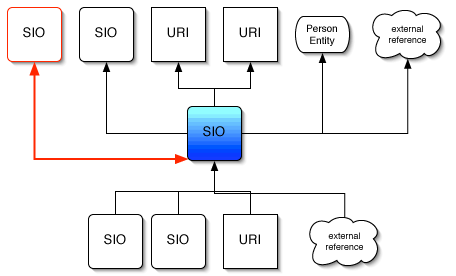
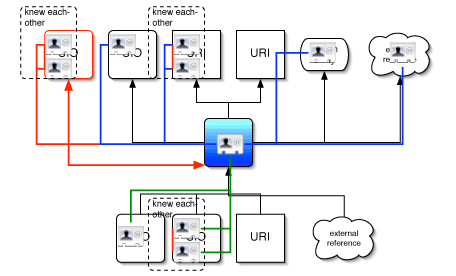
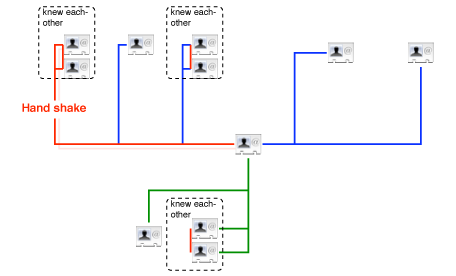
SIO links

SIO links, level1 - objects


SIO links, level2 - objects and people


SIO links, level3 - people

SI Search engine

Semantic InternetSIOs 1 - 10 of about nnn for TheQuery. (0.06 seconds) 

[ext - 1,4 Mo] This is the SIO's Title placeholder
This is the author(s) name(s) placeholder, each name is linked to a vCard-like identification page containing the SIOs signed by the author - present in x places
This is a small excerpt showing TheQuery in it's context… May be replaced by the short description of the SIO if available
Date of publication - Last update - CC lisence - Links - Thread - Categories - Keywords
- Find similar


This is just a simulation! Hand-made by modifying Scholar.Google results code. Nice isn't it?
I abused of the "title" attribute, so take a few seconds hovering over elements; there is info hidden.

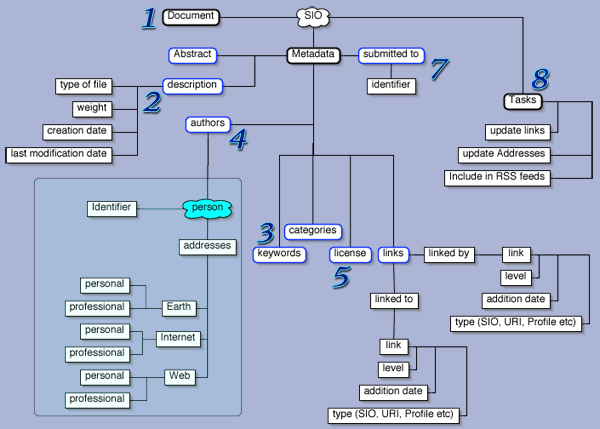
SIO graph

SIO graph


Now, this is just an idea, and, as publish it, I do have in mind to change some things in it, not just details. But this is a scrapbook and drafts are allowed :-)

Wednesday, January 19, 2005

linked to, linked by

SIOs contain information about sources of inspiration used by the author. Such links, I name linked to are useful to trace the history of the document.
Those elements linked by a SIO, becomes part of it, as roots. They may be other SIOs, or more conventional elements: DOIs, URIs, persons referenced by their vCard, or even references to objects outside the Internet.

The relation between two SIOs may become linked to/linked by strengthening their relation, each one referring to the other; such a relation may be build up by updates of the SIOs during a 'discussion' on a topic.

linked to and linked by will help building threads over the Net on particular subjects, helping identify the history of the thread as well as the contributors to the discussion. Some digital identification of the authors should be used to avoid the expected spammers of the system.

Semantic Internet Object

completely redefined SIOs new definition to come : 29.01.2005
I defined the SIOs [Semantic Internet Objects] as being the core component of the Semantic Internet.
What form could they adopt to be easy to handle and what could be the benefits of using them?

SIOs could be 'ziped containers', carrying a document, it's description, some information about the author, the license under which it is distributed and a document establishing relations to other SIOs.
The description including the automatically added keywords, and those supplied by the author, with the possibility to add a short description.
The information concerning the author may be in a standard format compatible with existing software, as the vCard format.
Common Content made already popular the use of licenses much more flexible then the previously existed copyrights and could evolve as it spread around the globe.
The history of conception of the SIOs and external references may be stored independently as they may contribute to create social networks, in a way I'll present.

An interesting variant of such a pack, for it's much lighter, could be produced by replacing the document by information allowing it's download, such as a .torrent file, and the vCard by a DOI, or any mix of those formats compatible. This would be a concentrate of the information relevant to the object/document, not including it.

Tuesday, January 18, 2005

Public Folder

The Public Folder is the one containing documents to be made available on the Semantic Internet. For each document within it a Semantic Internet Object[SIO] should be produced.

The public folder may be present only at the personal computer of users, or be synchronized, the same way as iDisks, to a distant hard disk space.

Desktop Search Engine

Or DSE to make it sort.
It's a search engine, accessible in individual computers, either incorporated in the system, as Spotlight will be, or installed as a standalone software, as Google's or Yahoo!'s soft are.
Without making any guess about those mentioned above, I'll describe what I would expect from a DSE participating to the structure of the Semantic Internet:
While building it's index, it should take a particular care for the indexation of the Public Folder. A separate index, the Public Folder Index should be made, prepared to be send to the General Index.

intro

The main intro is the presentation I published initialy.
Steve's post, Thank for the Memory, a recent discussion about easy access to documents on the Net and one of the traditional predictions for the New Year driven a special interestof mine to surface.

It would be nice to collect your opinions on the subject. First of all, read Steve's post. I think that what allowed the connexion of the two subjects was : The issue though, is not the amount of memory, but the need for massive and dynamic interconnect..

Now, a small historic of the elements that made me predict the building of what I named the Semantic Internet.
While following Steve Jobs keynote presenting Spotlight, a tool included in the next Mac OS X edition, Tiger. Spotlight's subtitle is "Find Anything, Anywhere Fast". I show applications for my job immediately, for building assistants based on this. What was a little bit tricky was the anywhere. I never considered my hard disk to be everywhere. What would be nice would be to really search everywhere, at least where shared resources are available.
In early 2003, with a few friends, we experimented the shared resources trough Apple's iDisks, a distant storage space, featuring a public space and password protected sections. That's a great way to share documents and each iDisk's index allow for fast searching, not as efficient as Spotlight should do, but good enough for us.
Some time after the presentation of Spotlight, Google announced the Google Desktop Search and I show Light ! ;-) What if...

  • The desktop search tool creates an index pointing to every available document, including those available in the "Shared documents" folder, then send to a central facility the subset concerning the shared ones.
  • Every index collected is compiled in a database conserving the accession data (probably a serial of the software rather then an IP, to be able to adjust to mobility),
  • then make this database available for searching via a simple interface, as Spotlight's or Google's

That means that a search would go through every available and shared document over the Net. Whaou!

Is that possible, interesting, economically sustainable, culturally acceptable and what would be the applications?

Possible
It seems so. Shared documents could be identified by DOIs [Digital Objects Identifiers] or something equivalent and tracked the same way as BitTorrent made usual.

Economically sustainable
As much as Google actually, as the same business model could apply, maybe combined with a "larger" Flickr-like service including sharing of every kind of document.
Computers are cheaper and cheaper, you can even get a Macintosh for $500 [o_O]
More and more people is connected via high-speed services, and stay connected permanently.
One point that is so obvious that it seems hidden, is that this is distributed computing! Each computer being charged with the creation of the index of the Shared Content, a task that would be to onerous to be carried out by a central facility.

culturally acceptable
As much as Lawrence Lessig describes it here, with people used to BitTorrent, Flickr, Common Content, Open Access, PLoS etc.
And Ideas would fly around as they actually do in blogs.

Interesting
I skipped this one to put it near the applications. While dreaming about the way to use Spotlight I imagined a fully linked text application for "intelligent" reading of scientific papers, automatically linking every relevant document to keywords spotted by the reader and constituting an aliases collection within the document. Imagine yourself in front of a review paper tagged this way, intellectual heaven :-)
For the moment I use an Applescript that transforms the selected word to a Google Search :
http://www.google.com/search?q=keyword&ie=UTF-8&oe=UTF-8
or http://scholar.google.com/scholar?q=keyword&ie=UTF-8&oe=UTF-8&hl=en&btnG=Search. That could be made automatically for every document, and include pertinent Shared Documents.
What do you think of it ?

Now, the second level would be to consider what you can build with such a facility: feeds. Aggregated content following your thoughts. If you have the right keywords, you may be willing to get new material as is made available, either as a notification (via an RSS reader or an e-mail alert) or even by direct download to a specified folder, limiting to some files formats virus free [this isn't paranoia, just protection].
Then you may be willing to share your feeds with other people as you can do already with Bloglines, distributing collections of links to pertinent documents covering some topic on which you have expertise, including your stuff, maybe some kind of review of the domain. That is for loops :-)

There are two elements I would like to see added.
First, the possibility to add keywords and abstract describing the document itself; probably using something like RDF, to be accessible for machines. Second, the possibility, not obligation, to sign in when you use one of the shared documents, in order to start building a web of awareness and bonds between the users of the system, something like the FOAF but rather named UOYR : User Of Your Ressource, or something like that.
The Semantic Internet would be born.

Do you see the parallel with Jeff Hawkins' model of the human brain ?

Memories : documents
Meta-memories : RSS feed for DOI collections
Interconnexion : the Net, it was build for that after all
Loops : Feeds of Feeds of ...
my addition: Specialized Neural Centers : UOYR webs

Now, as I said elsewhere, if my guess is wrong and Google, Apple, Yahoo! or whoever else aren't heading this way, someone should start working on that. As soon as possible. A year is a short lapse of time and I would like to see my prediction being realized.

There is a final consequence I would like to present for discussion.
Most experts are connected people. And they could decide to include on their Shared Documents Folder some reviews on specific terms, the same way they would write an encyclopedia entry. And tag it with a special tag, say Interpedia [for Internet Encyclopedia].
That would be one kind of an encyclopedia I would like to have handy :-)

Please, comment abundantly. And somebody have to print that and stick it there. I would like to here from those people at Redwood. Steve say that is a fine place for a brain spa... I do need something like that.

To keep the format closer to what a blog support, without being difficult to follow, I will split the subject in small portions each representing one aspect.
Syntheses will be proposed as documents "attached" to the blog, and as blog entries all of them dated 1st january 2005, as it is one of my predictions for 2005.
I will use a lot of abbreviations, so a companion page is set for a glossary.

It started like this...

[It started like this...]

Then I continued to think about it, and this is my scrapbook.
I hope that several points will be discussed with people much more aware of the subject then I am. For the simple reason that I'm not an Internet specialist, but a biologist, feeling that the Net is evolving to be "alive" and having fun thinking about the possible paths of evolution. But I hope participation of everyone, as I don't think that there are Semantic Internet specialists yet, but I have to Google around for a while to be sure about that. The first links I visited talk essentially about the semantic Web, not Internet in general.

So, don't read my scrapbook hoping for words from an expert.
Be patient if I ignore something that seems obvious to you, and helpful by spotting my deficiencies either via the comments of the blog or via e-mail. Any existing document on the subject is welcome.

If something is disturbing for you, I'll consider your message about it asap. Don't try the aggressive way in first place, this blog is mostly for fun ;-)